If you’re using a WordPress Google Sheets integration like SheetWise to sync your website data with Google Sheets, you may not want every single event to be recorded.
That’s where Conditional Logic comes in. It allows you to filter what gets synced so your spreadsheet stays clean, relevant, and easy to analyze.
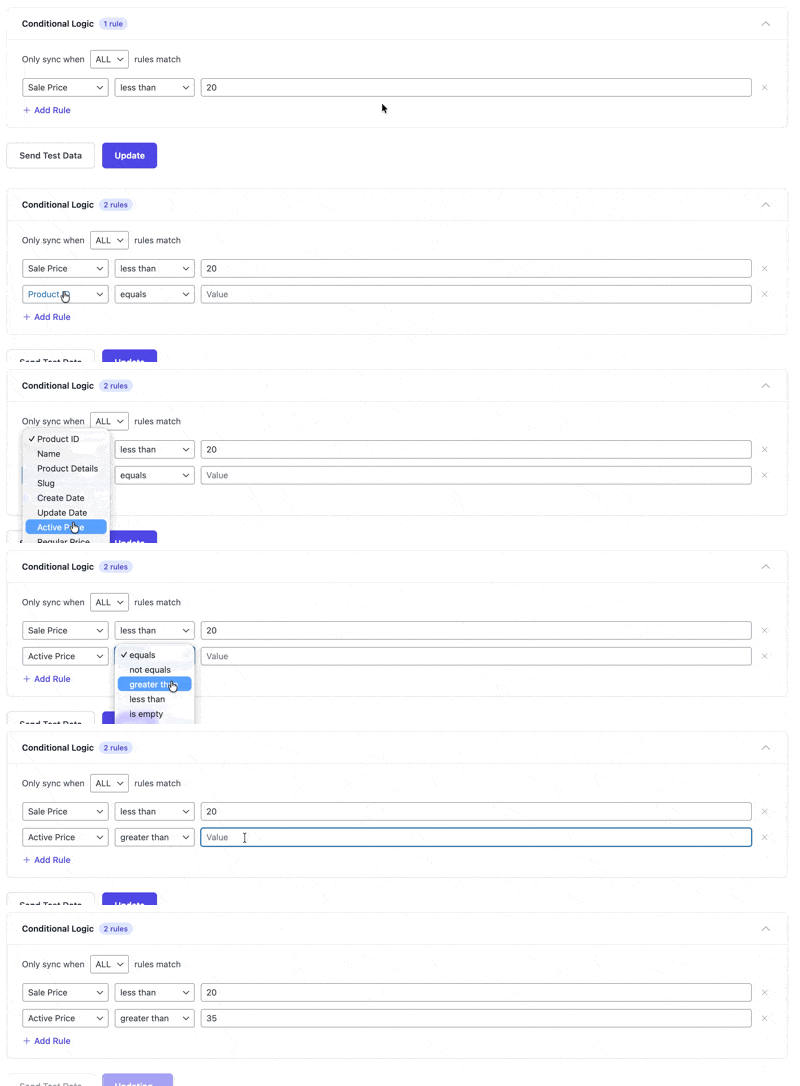
What is Conditional Logic in a WordPress Google Sheets Integration?
Conditional Logic lets you control which data is sent from WordPress to Google Sheets based on specific rules.
For example, you can:
- Only sync completed orders
- Only include users with company email addresses
- Skip empty or irrelevant fields
This ensures your WordPress Google Sheets integration only sends meaningful data.
How to Set Up Conditional Logic in SheetWise
- Open an existing integration or create a new one
- Configure your data source, spreadsheet, and column mapping
- Expand the Conditional Logic section
- Click Add Rule
- Select Field, Operator, and Value
- Save the integration
Available Operators
| Operator | What it does | Example |
|---|---|---|
| equals | Exact match | Status equals “completed” |
| not equals | Does not match | Role not equals “administrator” |
| contains | Text includes the value | Email contains “@company.com” |
| not contains | Text does not include the value | Title not contains “[Draft]” |
| greater than | Number or date is larger | Order Total greater than 100 |
| less than | Number or date is smaller | Order Total less than 50 |
| is empty | Field has no value | Description is empty |
| is not empty | Field has a value | URL is not empty |
ALL vs ANY Rules
When using multiple conditions in your WordPress Google Sheets integration, you can define how rules are combined.
ALL Rules Must Match
Every condition must be true. Example: Order total greater than 100 and status equals completed.
ANY Rule Can Match
At least one condition must be true. Example: Role equals admin or role equals editor.
What Happens to Filtered Events?
Events that do not meet your conditions are skipped. They appear in the Sync Log with a “Skipped” status. They are not treated as errors and do not trigger alerts.
Best Practices
- Start with one rule and expand gradually
- Test using sample events before going live
- No rules means everything will sync by default
Why Conditional Logic Improves Your WordPress Google Sheets Integration
- Reduces unnecessary data
- Improves reporting accuracy
- Saves time on cleanup
- Keeps your Google Sheets organized
Final Thoughts
Conditional Logic gives you full control over your WordPress Google Sheets integration. Instead of syncing everything, you sync only what matters.
If you’re using SheetWise, this feature can significantly improve how your data is managed and analyzed.